SKETCHUP EXTENSION FOR CABINET DESIGNYour Next Concept is Ready.
Now Get it Designed.
SketchData Design Tools runs inside SketchUp and turns your next project into 3D modeled design. Quickly place cabinets, change styles, set standard configurations and unify design language all from an easy to use interface.
Available inside
Sketchup
Cabinet
Catalog
Dynamic
Components
THE DIFFICULTY IN YOUR PROCESS
You know what the design should look like.Getting it drawn is the problem.

Drawing from scratch wastes time
Recreating the same basic catalog components and profiles - then updating every single part for a simple design revision.

Cabinet door modeling is difficult
Drawing individual cabinet doors and switching from slab to 5 piece or integrated pulls is difficult and annoying - this should be simple.

Multiple styles in one elevation
Designing multiple styles and features into a single area is hard to manage - keeping track of what goes where introduces errors in intent and manufacturing.

Client revisions don't change themselves
Getting a new drawing set updated and submitted feels like starting over even for simple changes. There's got to be a better way.
THE FIX
SketchData Design Tools
saves time by
automating changes
Your design is ready to be drawn in the 3D model. SketchData Design Tools includes a comprehensive cabinet catalog and easy to use tools for changing all the sizes, styles and configurations on the fly - all from a simple interface.
- Cabinet Catalog
- Door Styles
- Construction Standards
- Group Finishes
- Works in SketchUp Pro
WHAT SKETCHDATA DESIGN TOOLS DOES
Fast and accurate cabinet design workflow-optimized to save you time and money.
SketchData Design Tools makes designing kitchens more intuitive as it provides a vast library of pre-modeled kitchen cabinets. Users can effortlessly drag and drop these components into their designs, saving valuable time and ensuring accurate placement. The extension also facilitates real-time collaboration, allowing designers to share projects seamlessly. Its advanced parametric features enable swift adjustments, ensuring flexibility and precision in design. SketchData ultimately empowers SketchUp users to create stunning kitchen layouts with ease, optimizing the entire design process.

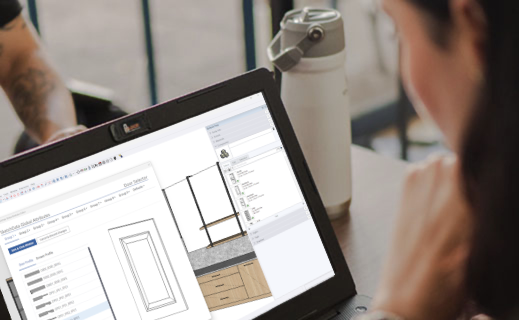
Graphical Style Chooser
Quickly swap door styles, drawer styles, pull types, materials and standard configuration options with ease from an easily understood and used graphical chooser.
EASILY SWITCH DESIGN LANGUAGE

Component Replacement
Drop a SketchData dynamic cabinet component from the catalog into your model and watch the door style, drawer style, materials and pulls swap to match the currently selected group.
AUTO UPDATE COMPONENTS

Print-Ready Reports
Generate clean, formatted paper reports you can hand to a client, subcontractor, or project manager - directly from inside SketchUp. No extra formatting required.
PROFESSIONAL CLIENT DELIVERABLES

SketchData Dynamic Catalog
Bases, walls, talls, end panels, pulls, multiple door styles, materials and full configuration options make this constantly expanding catalog of cabinet parts and accessories a simple way to knock your next project out of the park.
COMPREHENSIVE CABINET CATALOG

Construction Standards
Define construction standards per group for multi-style rooms or to define separate product lines with ease. Construction standards define the default cabinet sizing & configuration, front options, drawer box configurations and face frame settings.
ALWAYS IN SYNC WITH YOUR VISION

Door Style Selector
Select a door and drawer combination from available door styles downloaded to your door styles folder and update an entire room in seconds! Upgrade to an active subscription to unlock the multi group function and utilize multiple style sets within a single drawing file.
SWAP STYLES WITH EASE
BUILT FOR PEOPLE LIKE YOU
If you’re in SketchUp, you’re already halfway there.
SketchData Design Tools was built for people who build, design, and create with SketchUp every day - and who need to quickly and easily design and layout custom cabinetry inside SketchUp models.

Kitchen & Bath Designers
Quickly layout rooms with single or multiple design intents and update entire rooms at once. Assist clients with visual representation of design concepts and space planning.
USE CASE: Design drawings · 3D renders · Proposal prep

Architects & Interior Designers
Take your design from concept to 3D model and design drawings with ease and accuracy. Quickly deliver designs for signoff and move to production with confidence.
USE CASE: Design documentation · Client deliverables · Model audits

Cabinetry & Millwork Pros
Get component-level detail on cabinet types, sizes, and quantities across your whole kitchen or millwork project. Optimize time spent on design to engineering workflows and eliminate errors with shared model information. Use the pricing feature to build accurate quotes fast.
USE CASE: Cabinet counts · Shop drawings · Client quotes

Construction Professionals
Generate material takeoffs and pricing estimates straight from your construction models. Share accurate component counts with your team or subcontractors without a separate estimating tool.
USE CASE: Bid prep, Material estimates, Subcontractor takeoffs
SEE IT IN ACTION
Watch how SketchData Design Tools works inside SketchUp.
Seeing it run is faster than reading about it. These videos walk through the design and modeling features of the extension.
Introduction to SketchData Design Tools
A walkthrough of the core design tools features - cabinetry designs, using the component catalog, toolbar features and getting started with SketchData.
Using Product Groups
Dive deeper into SketchData's advanced grouping capabilities - setting construction standards, door fronts, and material colors.
FREQUENTLY ASKED QUESTIONS
Questions people ask before installing.
Still not sure if SketchData Design Tools is right for you? These are the most common questions.
What is SketchData Design Tools?
SketchData Design Tools is a SketchUp extension that integrates seamlessly with Sketchup with a user friendly graphical chooser allowing for quickly updating your 3D interior designs. Choose from a wide variety of cabinet configurations and door styles with built-in customization options.
How do I install SketchData Design Tools?
Open the downloads page and click the "Download Extension Version 3.x.y" button to download the latest plugin rbz file. Open Sketchup Pro version currently supported by Trimble. Select "Extensions > Extension Manager" from the Sketchup menu. Click the "Install Extension" button. Locate and open the "SketchData Extension 3.x.y.rbz" file downloaded earlier.
Are cabinet catalogs included with SketchData Design Tools?
Yes. Design Tools & Complete subscriptions include full access to the SketchData Dynamic Catalog along with all catalog updates and new additions while the subscription is active. Non-subscription users have access to a limited free demo catalog with a basic item set, updates included. The Sketchup extension integrates a catalog update feature to check for and download any new or updated components directly into the configured directories with the click of a button. Visit our catalog page for more information.
Does this work with SketchUp Go or SketchUp Studio?
SketchData Design Tools is designed to work within SketchUp Pro or Studio, which is available through Trimble. It runs as an extension with toolbar and menu items added to your existing Sketchup installation. SketchUp Go (web and iPad only) does not currently support extensions and is not compatible with SketchData Design Tools.
What kinds of reports can SketchData generate?
SketchData Reports can generate component count reports, material quantity takeoffs, pricing reports based on your component data, and printable paper reports formatted for client or team delivery. Reporting is installed with the Design Tools extension and is fully functional with a Complete subscription.
How do materials work with grain direction?
Catalog item parts assigned a material through the SketchData interface are grain direction aware and display textures oriented to match. 5 piece doors automatically rotate textures to align with typical construction practices.
What industries use SketchData Design Tools?
SketchData Design Tools is used by interior designers, cabinetry makers, construction professionals, architects - anyone who needs to quickly and easily design and layout custom cabinetry inside SketchUp models.
Can SketchData Design Tools generate pricing estimates?
Yes. SketchData Design Tools can incorporate pricing data into component reports using the built-in SketchData Reports engine, giving you material cost estimates based on your model's components - a valuable feature for construction bids and client proposals.
Does SketchData Design Tools work with metric measurements?
Yes. SketchData Design Tools features full support for native Sketchup units of measure. SketchData also maintains separate catalogs with unique naming conventions and default attributes for better sizing of components when switching between US customary and metric items. Please see the help article for more details.
GET STARTED TODAY
Your concepts are ready for design.SketchData enables them.
Stop drawing everything by hand. Stop reinventing the wheel for every project. Stop intensive redesign every time the design changes. Install SketchData Design Tools and start speeding up your design process while generating beautiful design drawings.
REQUIRES SKETCHUP PRO • ACCELERATE DESIGN WORKFLOWS