Switching Imperial & Metric Catalogs
Version 3.2Catalog Options and Switching
SketchData maintains separate catalogs with unique naming convention and default attributes for better sizing of components.
The metric and US customary SketchData dynamic cabinet catalogs can be swapped through the settings interface window. Only one catalog can be downloaded to the SketchData component catalog folder at a time. Switching between catalogs will always download the latest revisions of the SketchData catalog.
Choosing a Catalog
A catalog can be chosen through the Sketchup "Extensions > SketchData > Settings" windows. Simply select either "US Customary Catalog with SketchData Naming Conventions" or "Metric Catalog with European Naming Conventions" and click the Save button. The selected catalog will be downloaded to the directory set under the "Component Catalog Folder" setting.
Switching Global Default Settings
Global defaults control the baseline SketchData dynamic component settings for new files without existing embedded SketchData configuration. These defaults can be imported & exported or swapped for initial default settings.
SketchData ships with two available global default settings configurations, inch and metric. The default catalog and global default settings for a new install are inch based.
Match Defaults to New Catalog
When switching between catalogs a notification popup appears which allows keeping your existing settings or switching to the initial standard to match the new catalog.
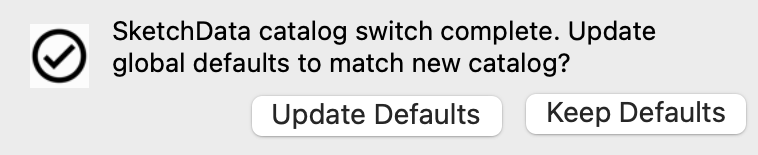
"Update Defaults" creates a backup of the current global defaults configuration in the SketchData directory and overwrites the current settings with SketchData baseline configurations. To import a previously backed up configuration use the "Extension > SketchData > Utilities > Import Global Attribute Defaults" menu item and select the desired backup JSON file. The backup directory can be found using the "Extension > SketchData > Support > Sketchdata Directory" menu item.
Manual Switching
The defaults can be switched to initial configurations at any time using the "Extensions > Sketchdata > Utilities > Switch to [Metric|US Customary] Global Attribute Defaults" menu items. Using these options will backup the current configuration in the same folder as the notification prompt described above.