Material Picker
Version 3.0Material Picker Interface
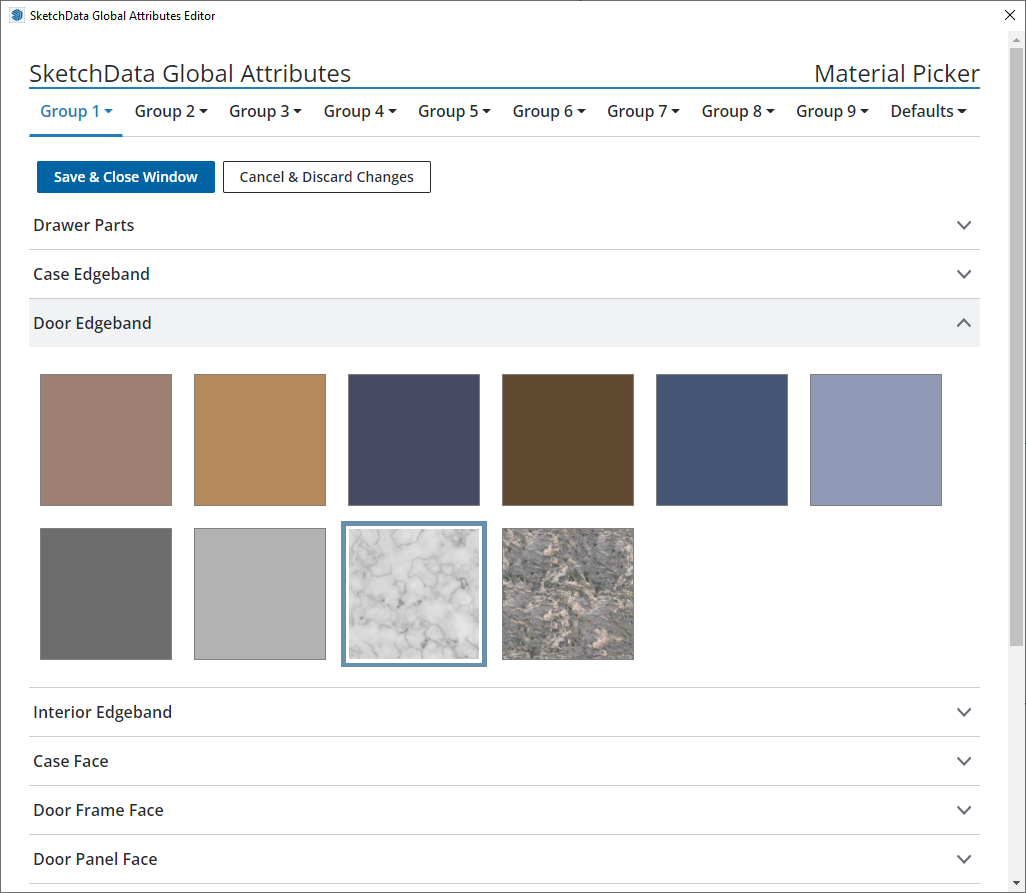
The material picker is used to set material swatches for all the predefined parts of typical cabinet construction. Materials are populated from the model's list of available materials. Standard or custom library naterials are not imported into the material picker unless they have been added to the model using the material sidebar menu or through painting an item in the model.
Toassign a material to a group part definition click the desired group tab and select material picker from the dropdown list. Click the accordian name of the part to open the swatch list and selec the desired material from the list of material images. The currently selected material is highlighted with a blue border. To see the name of a material swatch hover over the image and the alt text will display the name of the material swatch.
Known Limitations
- Opacity does not currently display in the material picker. Selected materials will correctly display in the model after selecting a material with transparency.
- Materials with a tinted color filter currently display the original image in the material picker. Tinted materials will correctly display in the model after selecting a material with a colored tint.